
Workforce overview
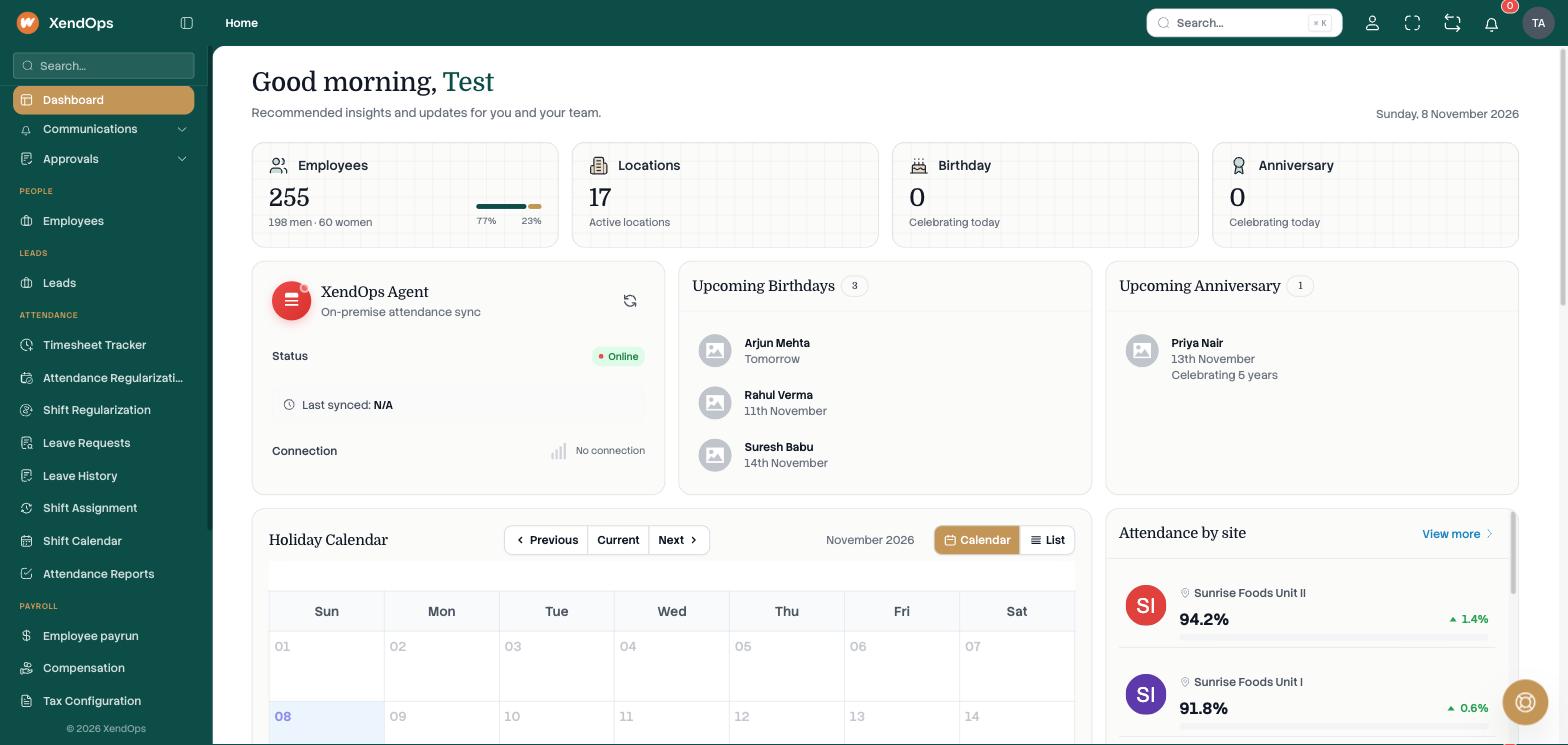
Know who is in, at every site
Headcount, locations and attendance by site, with the sync status of the attendance agent at each location.
- Attendance by location
- Live health of each site’s device agent
- Upcoming birthdays

HRMS & payroll · Factories, production companies, software firms, collection agencies
Biometric attendance, shifts, leave and statutory payroll for teams across every site.
Why switch
Before: Month-end payroll takes days of spreadsheet work
After: Attendance and overtime flow straight into the payroll run
Before: Statutory deductions get calculated by hand
After: PF, ESI, PT and TDS worked out in the same run
Before: Late marks and permissions tracked by hand
After: Late and permission policies applied automatically to biometric punches
Modules
Turn on what you need today and add the rest as you grow.
Punches from biometric devices flow in, with a timesheet for every employee and site.
Shifts with half-day, overtime and overnight rules, plus late and permission policies.
Leave cycles, carry-over, prorata and sandwich rules, with approvals.
Payruns by location with statutory deductions and the Old or New tax regime.
Add or remove pay components by department, designation or employee.
Leave, regularization and shift approvals in one inbox, on web and mobile.
Send messages to employees from templates, with a live preview.
Payslips, leave, timesheets and approvals on the web and the mobile app.
Workforce overview
Headcount, locations and attendance by site, with the sync status of the attendance agent at each location.
Attendance & timesheets
Biometric devices are registered to each location and an on-site agent syncs every punch. Each employee gets a timesheet, with regularization when a punch is missed.
Attendance › Timesheet tracker
Timesheet · Mon 9 Nov
| Employee | Shift | In | Out | Hours | Status |
|---|---|---|---|---|---|
| Arjun Mehta | General | 08:52 | 18:04 | 9h 12m | Present |
| Priya Nair | General | 09:21 | 18:10 | 8h 49m | Late |
| Rahul Verma | Night | 21:55 | 06:02 | 8h 07m | Present |
| Deepa S | General | 08:58 | 20:15 | 11h 17m | Overtime 2h |
| Kavitha R | General | 10:30 | 18:00 | 7h 30m | Permission |
| Suresh Babu | General | 09:02 | 13:05 | 4h 03m | Half-day |
| Manoj K | General | — | — | — | Absent |
Shifts & policies
Plan shifts on a calendar, assign them in bulk and let the rules handle late marks, permissions and overtime.
Attendance › Shift calendar
Week of 9 November
Leave management
Set up each leave type with its cycle and rules. Employees apply from the app and managers approve from theirs.
Settings › Leave master
Casual leave
Allowance
Cycle
Days per cycle
Leave type
Prorata for new joiners
Carry over unused days
Up to 6 days
Rules
Sandwich rule
Count weekends and holidays between leave days
Max consecutive days
Eligible departments
Payroll
Start a payrun for each location, review every employee’s pay, finalise it and set the pay day. EPF, ESI, PT and income tax are worked out as part of the run.
Payroll › Employee payrun
October payruns
| Location | Employees | Gross | Net pay | Pay day | Stage |
|---|---|---|---|---|---|
| Unit I | 96 | ₹ 21,84,000 | ₹ 19,72,350 | 1 Nov | Paid |
| Unit II | 82 | ₹ 17,46,500 | ₹ 15,80,120 | 1 Nov | Paid |
| Warehouse | 41 | ₹ 7,92,000 | ₹ 7,18,640 | 3 Nov | Finalised |
| Head office | 36 | ₹ 14,40,000 | ₹ 12,61,900 | — | In review |
Salary changes & payslips
Add or remove a pay component for a department, a designation or a list of employees, with a date it ends. Then send payslips in the format you prefer.
Payroll › Compensation › Bulk update
Bulk salary update
Who
Apply by
Department
What
Action
Component
Amount per month
Ends on
People
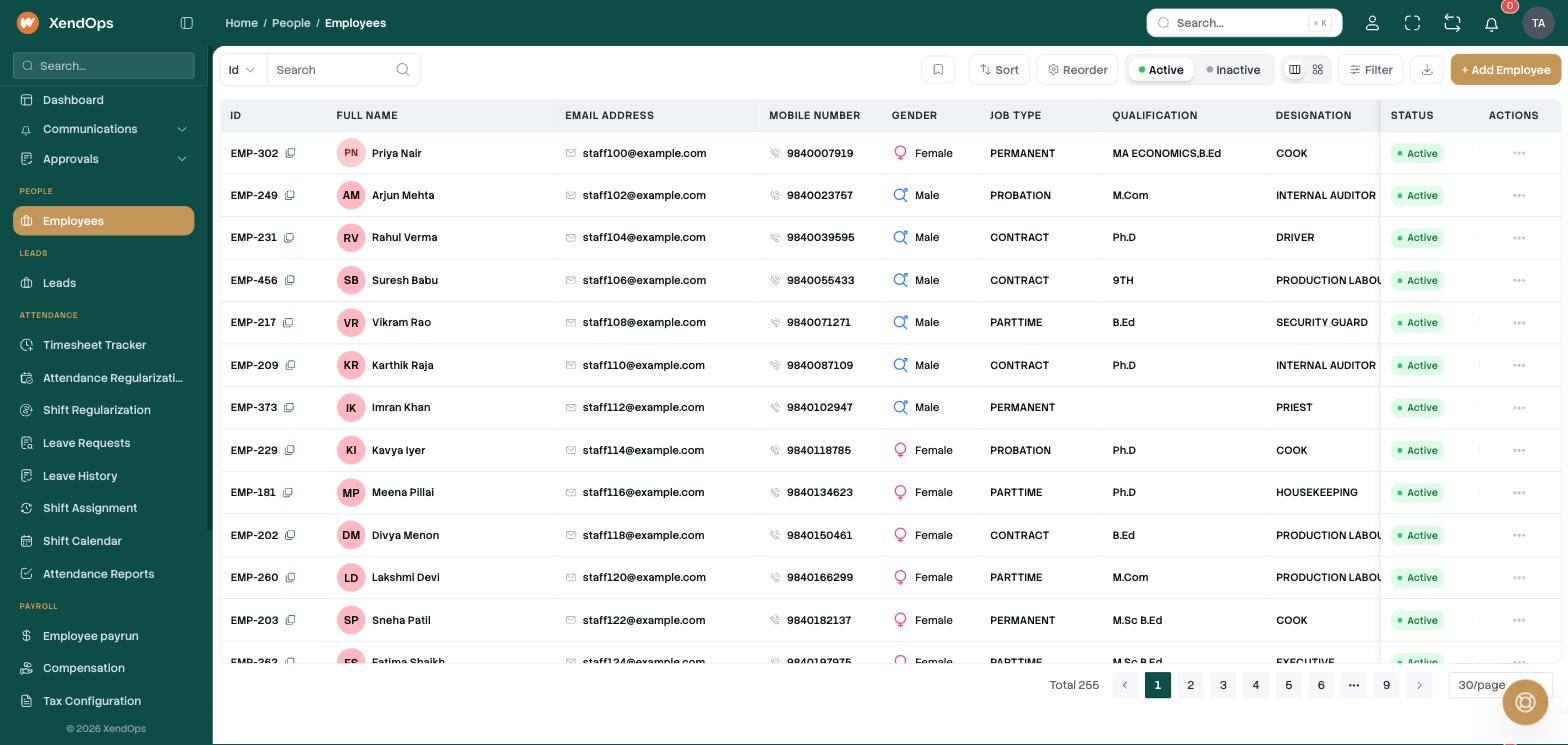
Every employee’s job type, designation, location and status, ready for shifts and payroll.
Inventory
Raise purchase requests and orders, receive goods and move stock between locations.
Inventory › Goods received
Goods received notes
| GRN no | Against PO | Vendor | Location | Items | Status |
|---|---|---|---|---|---|
| GRN-1182 | PO-0904 | Acme Safety Gear | Unit I | 120 | Received |
| GRN-1183 | PO-0907 | Northwind Packaging | Warehouse | 2,400 | Received |
| GRN-1184 | PO-0911 | Brightline Tools | Unit II | 36 | Partly received |
| GRN-1185 | PO-0912 | Clearwater Uniforms | Unit I | 180 | Pending |
How it runs
The biometric device records the punch and the site agent syncs it.
Shift rules mark late, permission, half-day and overtime.
Leave and regularization requests are approved on web or mobile.
Payroll runs by location with EPF, ESI, PT and income tax.
Employees see their payslip and compensation in the app.
Portals & apps
For HR & payroll
Everything for running the workforce.
For employees
Self-service on the web.
For employees & managers
The same, on the phone.
Integrations
Connections that are built into the product today.
Attendance
Devices registered to each location by serial number.
On-site sync
Syncs punches from each site, with a live health widget on the dashboard.
Sign-in
Google SSO or a password, chosen per company.
Messaging
Messages to employees, groups or lists. Email goes out from your own mail server or Gmail.
Addresses
Address autocomplete for locations and employees.
Data
Import employees and export every report.
Control
Set who approves leave, regularization and shift requests.
HR, payroll, managers and employees each see only what they need.
Freeze attendance at a date so payroll numbers stop moving.
Choose Google sign-in or passwords for your company.
Industries
FAQ
See it on your own day: your classes, your shifts or your menu.